
Jujutsu Beatdown Sticker List, Summon Odds and Reactions
Find stickers by rarity, roll for new ones, and assign an owned sticker to an automatic reaction.
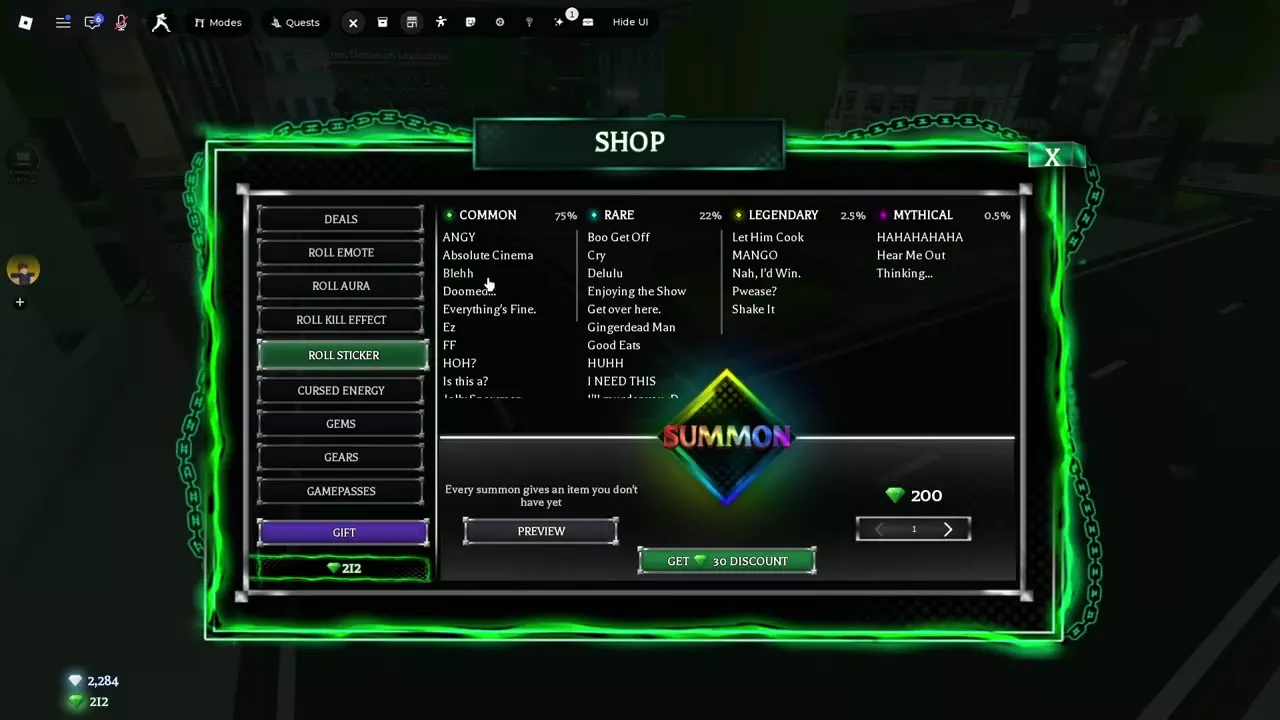
A standard sticker summon costs 200 Gems and gives you a sticker you do not already own. Equip it under Inventory → Stickers, then use the Sticker Menu to assign it to a reaction.
Roll Sticker Cost and Odds
A standard single summon costs 200 Gems and adds one unowned sticker to your collection.
- Open Shop → Roll Sticker.
- Select Preview to inspect the stickers.
- Choose a quantity and select Summon.
| Rarity | Summon odds |
|---|---|
| Common | 75% |
| Rare | 22% |
| Legendary | 2.5% |
| Mythical | 0.5% |
The odds apply to rarity, rather than a specific named sticker. For ways to fund your rolls, see the Gems and Kill Bank guide.
Sticker Directory
Search the Roll Sticker pool by name or filter it by rarity. Select a sticker to see its details.
Find a Sticker by name or rarity before rolling or assigning a reaction.
31 objects
|
|
Common | — | — | — |
|---|---|---|---|---|
|
A Sticker available through Roll Sticker. |
||||
|
|
Common | — | — | — |
|
A Sticker available through Roll Sticker. |
||||
|
|
Common | — | — | — |
|
A Sticker available through Roll Sticker. |
||||
|
|
Common | — | — | — |
|
A Sticker available through Roll Sticker. |
||||
|
|
Common | — | — | — |
|
A Sticker available through Roll Sticker. |
||||
|
|
Common | — | — | — |
|
A Sticker available through Roll Sticker. |
||||
|
|
Common | — | — | — |
|
A Sticker available through Roll Sticker. |
||||
|
|
Common | — | — | — |
|
A Sticker available through Roll Sticker. |
||||
|
|
Common | — | — | — |
|
A Sticker available through Roll Sticker. |
||||
|
|
Rare | — | — | — |
|
A Sticker available through Roll Sticker. |
||||
|
|
Rare | — | — | — |
|
A Sticker available through Roll Sticker. |
||||
|
|
Rare | — | — | — |
|
A Sticker available through Roll Sticker. |
||||
|
|
Rare | — | — | — |
|
A Sticker available through Roll Sticker. |
||||
|
|
Rare | — | — | — |
|
A Sticker available through Roll Sticker. |
||||
|
|
Rare | — | — | — |
|
A Sticker available through Roll Sticker. |
||||
|
|
Rare | — | — | — |
|
A Sticker available through Roll Sticker. |
||||
|
|
Rare | — | — | — |
|
A Sticker available through Roll Sticker. |
||||
|
|
Rare | — | — | — |
|
A Sticker available through Roll Sticker. |
||||
|
|
Legendary | — | — | — |
|
A Sticker available through Roll Sticker. |
||||
|
|
Legendary | — | — | — |
|
A Sticker available through Roll Sticker. |
||||
|
|
Legendary | — | — | — |
|
A Sticker available through Roll Sticker. |
||||
|
|
Legendary | — | — | — |
|
A Sticker available through Roll Sticker. |
||||
|
|
Legendary | — | — | — |
|
A Sticker available through Roll Sticker. |
||||
|
|
Mythical | — | — | — |
|
A Sticker available through Roll Sticker. |
||||
|
|
Mythical | — | — | — |
|
A Sticker available through Roll Sticker. |
||||
|
|
Mythical | — | — | — |
|
A Sticker available through Roll Sticker. |
||||
|
|
— | 330 Gems Quantity 1 | 49 Gems Quantity 1 | 76 % |
|
The Shop menu for previewing and summoning Auras. Each summon gives an Aura you do not own.
|
||||
|
|
— | 200 Gems Quantity 1 | 30 Gems Quantity 1 | 75 % |
|
The Shop menu for previewing and summoning Stickers. Each summon gives a Sticker you do not own.
|
||||
|
|
— | 350 Gems Quantity 1 | 52 Gems Quantity 1 | 75 % |
|
The Shop menu for previewing and summoning Kill Effects. Each summon gives a Kill Effect you do not own.
|
||||
|
|
— | 300 Gems Standard summon | 45 Gems VIP | 74 % |
|
The Shop menu for summoning Emotes. Each summon gives a unique Emote.
|
||||
|
|
— | — | — | — |
|
A Sticker Menu feature that assigns a chosen Sticker to an automatic trigger.
|
||||
Equip a Sticker and Set a Reaction
- Open Inventory → Stickers and select an owned sticker to equip it.
- Open the Sticker Menu, choose an automatic reaction trigger, and assign the sticker you want to display.
A sticker assigned to the kill reaction pops up with its text when you eliminate another player. The Sticker Reactions release on April 17, 2026 offered four automatic trigger options.
The Extra Emotes + Stickers pass adds equipment slots for both cosmetics. See Game Passes for its price and other pass details. After the V2 November 14 patch, the sticker wheel supports switching between a controller and mouse during play.
Articles and guides
6Jujutsu Beatdown Aura List and Summon Guide
Browse the Jujutsu Beatdown aura list, check summon costs and rarity odds, and learn how to preview and equip Auras.
Jujutsu Beatdown Sticker List, Summon Odds and Reactions
Browse the Jujutsu Beatdown sticker list, check summon odds and costs, and learn how to equip stickers and set kill reactions.
Jujutsu Beatdown Kill Effect List and Summon Odds
Browse the Jujutsu Beatdown Kill Effect list, check summon odds and costs, and learn how to equip effects and use Kill Emote prompts.
Jujutsu Beatdown Emote List and Wheel Guide
Browse the Jujutsu Beatdown emote list, check roll costs and odds, equip the wheel, and use interactive emotes with dummies.
How to Change and Save Cursed Energy Colors in Jujutsu Beatdown
Change your Cursed Energy color in Jujutsu Beatdown, save rolls with the Backpack, and restore the default or an Awakening color.
Jujutsu Beatdown Gameplay, Performance and Audio Settings
Find Auto Run, debris and screen-flash controls in Jujutsu Beatdown. Mute music while keeping sound effects, read FPS and ping, and customize awakenings and sounds.