
Jujutsu Beatdown Private Server Commands and Training
Use Private Plus to set up repeatable combo, counter, and Awakening practice in Jujutsu Beatdown. If your group wants to fight Thukuna for The Strongest, keep a separate private server for random events.
Private Server Plus costs 399 Robux. Open Private Plus, choose a player under Command Target for player-specific commands, or use Dummies → Spawn Normal Dummy for a full-health target. Using any PS+ command permanently disables random modes on that server. With events still enabled, defeating Thukuna can drop The Strongest, and private-server events award no Gems.
Private Server Access and Event Eligibility
| Goal | Access | Result |
|---|---|---|
| Build a map | Free in a private server | Custom map editor |
| Set up combat practice | Private Server Plus · 399 Robux | Combat commands and dummies |
| Play random events | No PS+ commands used | Random modes stay eligible |
The first use of a PS+ command permanently disables random modes on that server. Keep commands unused on the server where your group wants to play Team Beatdown, Unseal Sukuna’s Finger, or Special Grade Threat. See the random Battlegrounds event objectives.
Private-server events award no Gems. If your group defeats Thukuna in Special Grade Threat, everyone who took part has a chance at The Strongest character drop. Contribution increases that chance per boss fight, with +10% for first place and +6% for second. Check the rewards screen for your result.
Private Plus Command Table
- Panel header. Command Target sets which player receives targeted commands.
- General. Use No Energy Cost to practice moves that spend Cursed Energy, Black Flash to activate it once, or Infinite Black Flash for repeated attempts. Gravity Multiplier applies to all players. Keep it at 1× for normal gravity.
- Modes. Reset Energy empties the target’s energy, and Activate Empowerment gives the target max energy. Empowerment Length sets how long energy empowerment lasts for all players. This section also contains the Awakening commands.
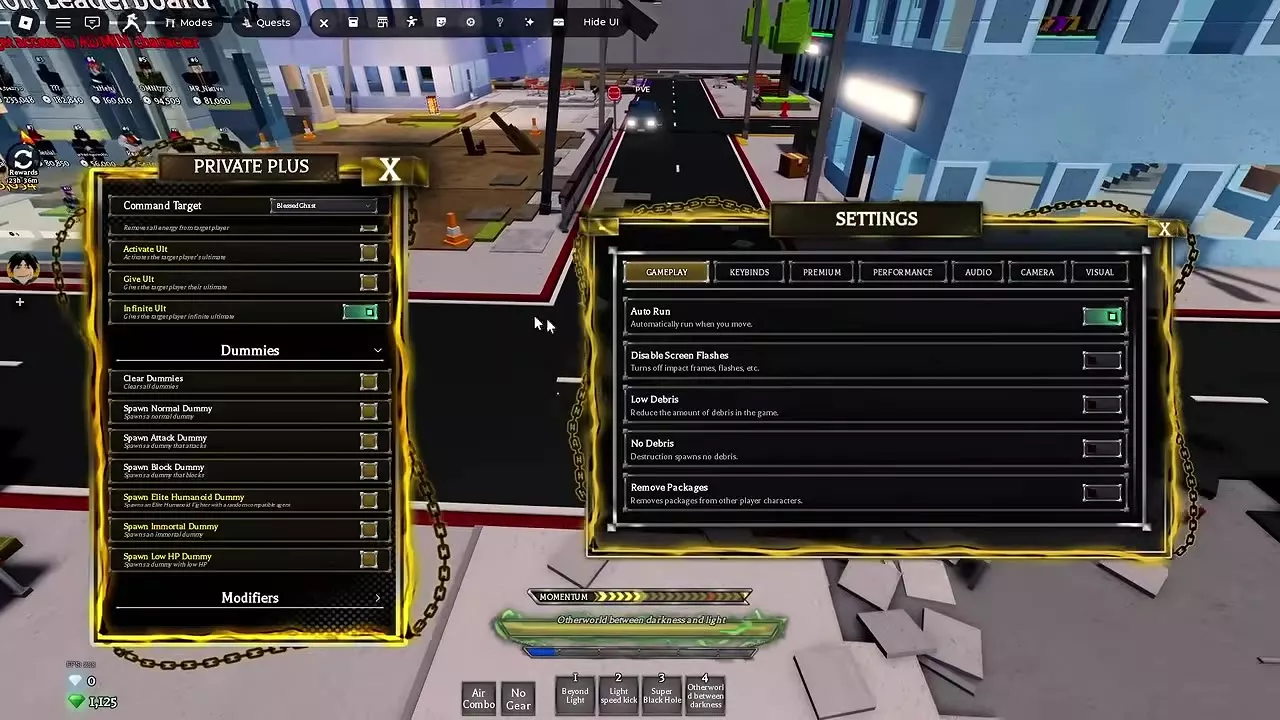
- Dummies. Use this section to spawn practice targets or clear them from the play area.
15 objects
| Name | Menu section |
|---|---|
Command Target |
Panel header
|
Clear Cooldown |
General
|
No Cooldown |
General
|
No Energy Cost |
General
|
Black Flash |
General
|
Infinite Black Flash |
General
|
|
General
| |
| |
Remove Ult |
Modes
|
|
Modes
| |
| |
Activate Empowerment |
Modes
|
Reset Energy |
Modes
|
Activate Ult |
Modes
|
Give Ult |
Modes
|
Infinite Ult |
Modes
|
Clear Dummies |
Dummies
|
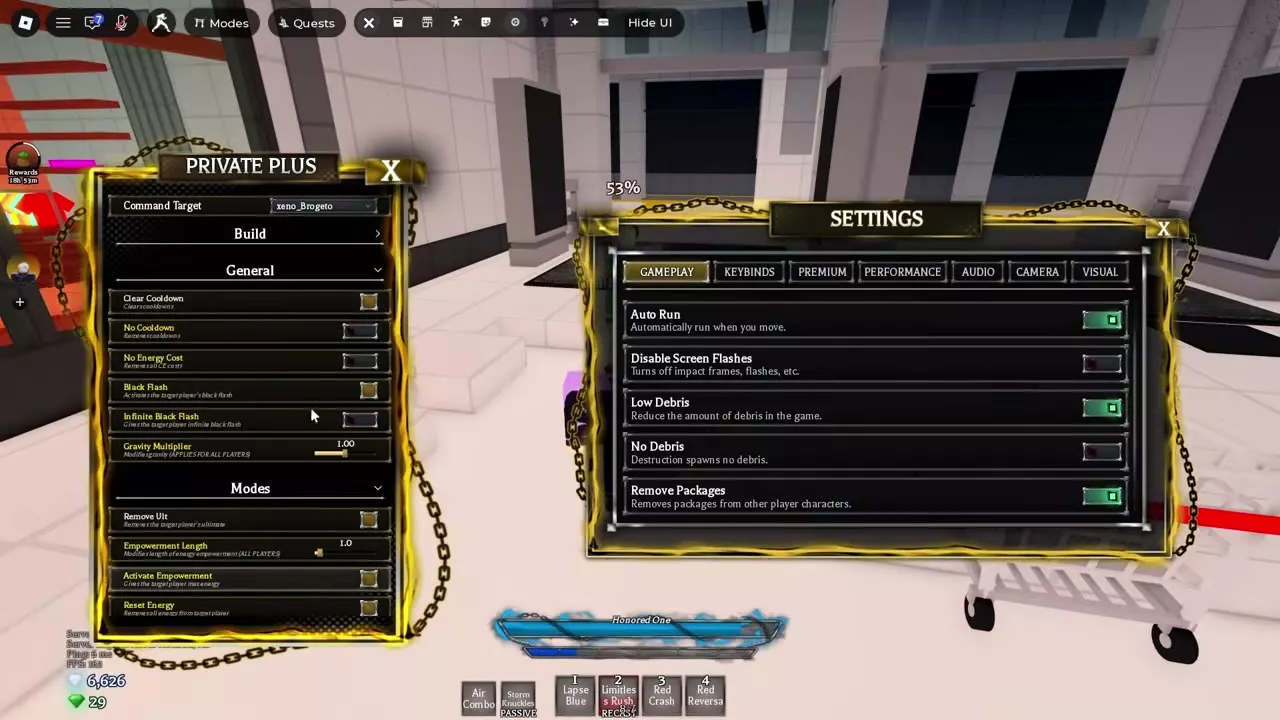
Set a Target and Spawn a Training Dummy
Set up cooldowns and Awakening
- Open Private Plus in your private server. Use Command Target above General to select the player you want to affect.
- Under General, use Clear Cooldown to reset moves for another attempt. Turn on No Cooldown when you want to repeat the same sequence without waiting between attempts.
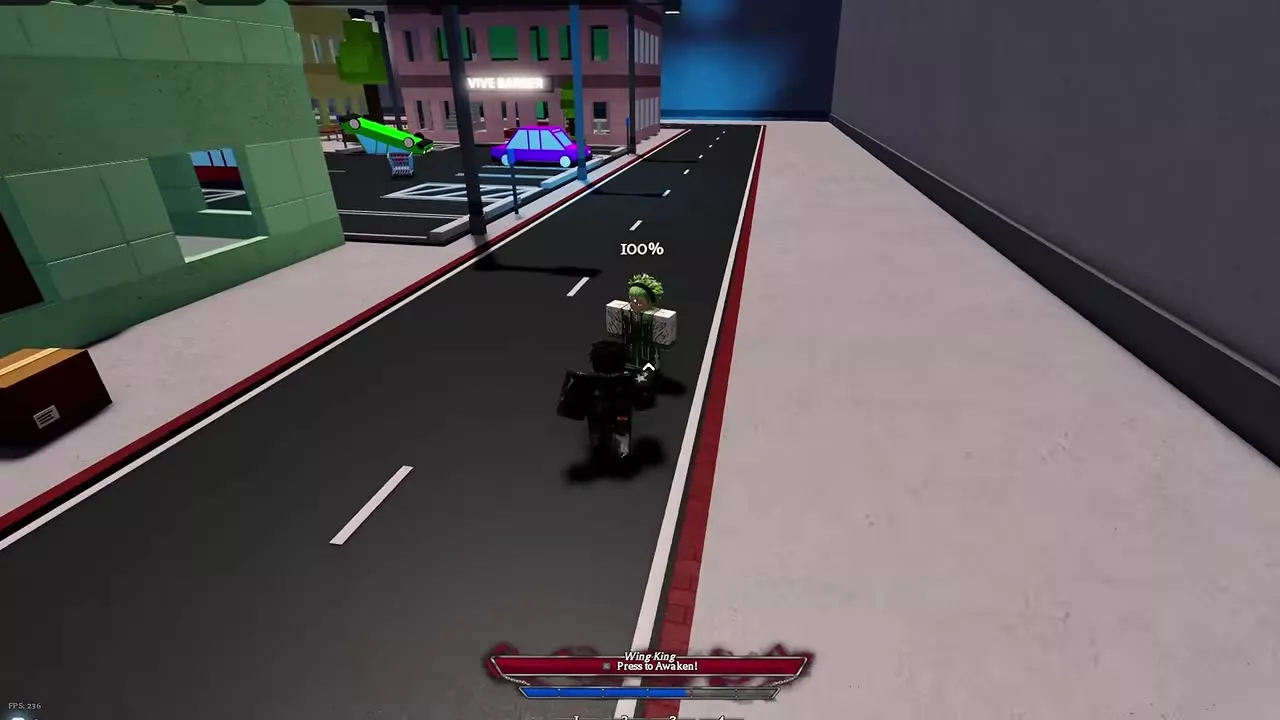
- Under Modes, use Give Ult to charge the target’s Awakening bar. A full bar displays Press to Awaken when manual activation is ready. Use Activate Ult to trigger Awakening directly, Remove Ult to take away the target’s ultimate, or Infinite Ult for repeated Awakening practice.
Spawn and clear dummies
- Expand Dummies in Private Plus. Select Spawn Normal Dummy for a standard combo target. Pick Spawn Attack Dummy to practice counters, Spawn Block Dummy to test moves against a guarding opponent, Spawn Immortal Dummy for sustained attacks, or Spawn Low HP Dummy to practice finishing blows. The same menu includes Spawn Elite Humanoid Dummy.
- Return to the play area. Look for 100% above a fresh Normal Dummy to confirm you have a full-health target.
- Use Clear Dummies when you want an empty practice area. Spawning a fresh dummy can leave an earlier downed dummy in place.
Dummies reset when they’re far away and left untouched. To interact with an Emote Interactable Dummy, stand near it and use an interactable emote.
Private Fighters and Build Mode
- Private fighters. Open Agent Select to find Private Plus options such as Senior Thukuna, Super Senior Gojo, and Mahoraga. Compare private-server fighters and their move sets.
- Custom maps. Use the Build entry at the top of Private Plus to open the free private-server editor. Choose a preset, edit your map, and publish to Discovery.
- Passes. Compare Private Server Plus with the other Jujutsu Beatdown game passes.
Articles and guides
3Jujutsu Beatdown Private Server Characters
Find Jujutsu Beatdown private server characters, compare access and kits, and learn Senior Thukuna and David's moves.
Jujutsu Beatdown Build Mode and Discovery Uploads
Build a custom map in Jujutsu Beatdown, choose a preset, collaborate with friends, save your work, and upload it to Discovery.
Jujutsu Beatdown Game Passes, Prices and Perks
Compare all nine Jujutsu Beatdown game passes by Robux price and perk, including VIP, Early Access, Private Server Plus and cosmetic options.