
Jujutsu Beatdown Aura List and Summon Guide
Find Auras by rarity, preview their effects, and manage your collection in Jujutsu Beatdown.
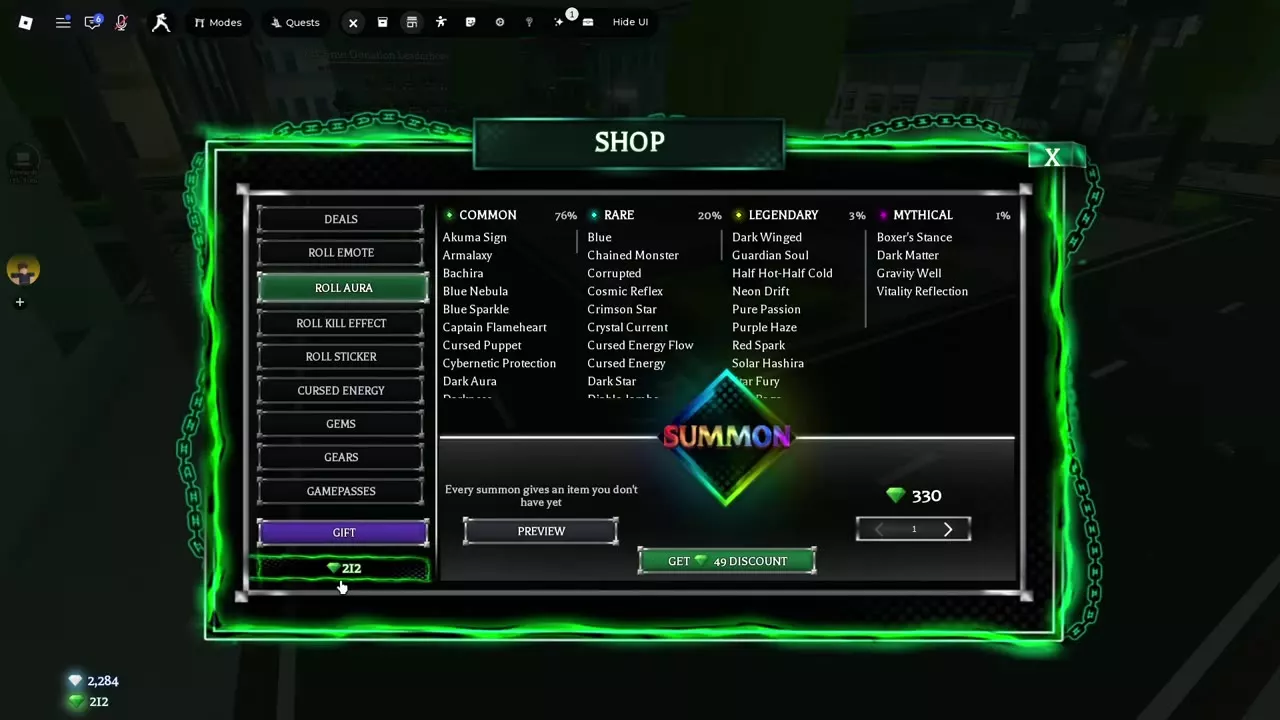
Open Shop → Roll Aura to preview and summon Auras. One standard summon costs 330 Gems and gives an Aura you do not already own. Equip an owned Aura through Inventory → Auras.
Roll Aura Cost and Rarity Odds
Open Shop → Roll Aura, choose a quantity, and select Summon. Each summon gives you an Aura you do not already own. A standard single summon costs 330 Gems.
| Rarity | Summon odds |
|---|---|
| Common | 76% |
| Rare | 20% |
| Legendary | 3% |
| Mythical | 1% |
These percentages describe the chance for each rarity group. Individual Aura odds are displayed separately in Preview. To budget for more summons, see the Gems and Kill Bank guide.
Aura Directory
Browse the directory by name or rarity and open an entry for its details. Pumpkin Blaze, Grave Mist, Bat Swarm, and Haunted were Halloween 2026 event Auras; the event ended at the V2 launch. The original 28-day Daily Rewards track also included two Auras, one exclusive to its month.
Find an Aura by name or rarity and check its individual preview or event details.
51 objects
|
|
Common | — | — | — |
|---|---|---|---|---|
|
An Aura available through Roll Aura. |
||||
|
|
Common | — | — | — |
|
An Aura available through Roll Aura. |
||||
|
|
Common | — | — | — |
|
An Aura available through Roll Aura. |
||||
|
|
Common | — | — | — |
|
An Aura available through Roll Aura. |
||||
|
|
Common | — | — | — |
|
An Aura available through Roll Aura. |
||||
|
|
Common | — | — | — |
|
An Aura available through Roll Aura. |
||||
|
|
Common | — | — | — |
|
An Aura available through Roll Aura. |
||||
|
|
Common | — | — | — |
|
An Aura available through Roll Aura. |
||||
|
|
Common | — | — | — |
|
An Aura available through Roll Aura. |
||||
|
|
Common | — | — | — |
|
An Aura available through Roll Aura. |
||||
|
|
Common | — | — | — |
|
An Aura available through Roll Aura. |
||||
|
|
Common | — | — | — |
|
An Aura available through Roll Aura. |
||||
|
|
Common | — | — | — |
|
An Aura available through Roll Aura. |
||||
|
|
Common | — | — | — |
|
An Aura available through Roll Aura. |
||||
|
|
Common | — | — | — |
|
An Aura available through Roll Aura. |
||||
|
|
Common | — | — | — |
|
An Aura available through Roll Aura. |
||||
|
|
Common | — | — | — |
|
An Aura available through Roll Aura. |
||||
|
|
Common | — | — | — |
|
An Aura available through Roll Aura. |
||||
|
|
Common | 80 | — | — |
|
A cosmetic Aura that surrounds the character with bright orange-yellow flames. TipsSelect it in Preview to see orange-yellow flames around the character. Its preview lists Common and 1 in 80. |
||||
|
|
Common | 80 | — | — |
|
A cosmetic Aura that gives the character a bright flame effect around the lower body. TipsSelect it in Preview to see the flame effect around the lower body. Its preview lists Common and 1 in 80. |
||||
|
|
Common | 80 | — | — |
|
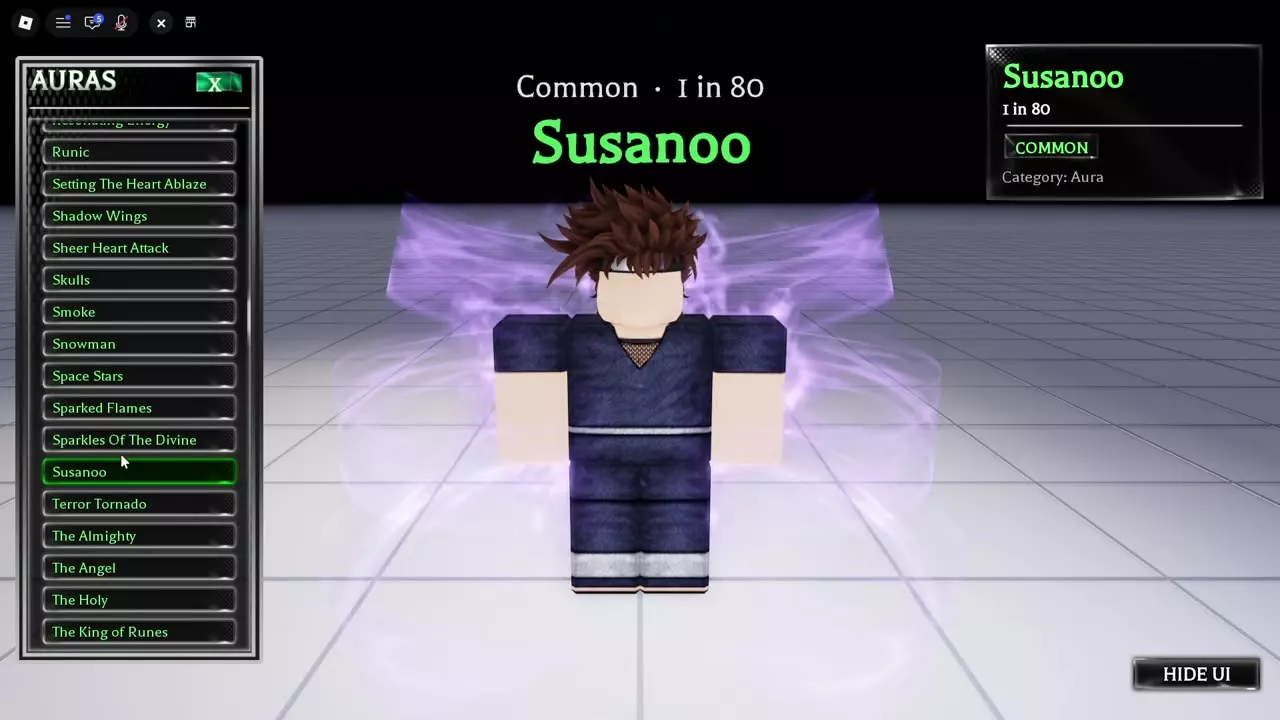
A cosmetic Aura that forms translucent purple energy behind the character. TipsUse Hide UI in Preview for a clear view of the purple energy behind the character. Its preview lists Common and 1 in 80. |
||||
|
|
Rare | — | — | — |
|
An Aura available through Roll Aura. |
||||
|
|
Rare | — | — | — |
|
An Aura available through Roll Aura. |
||||
|
|
Rare | — | — | — |
|
An Aura available through Roll Aura. |
||||
|
|
Rare | — | — | — |
|
An Aura available through Roll Aura. |
||||
|
|
Rare | — | — | — |
|
An Aura available through Roll Aura. |
||||
|
|
Rare | — | — | — |
|
An Aura available through Roll Aura. |
||||
|
|
Rare | — | — | — |
|
An Aura available through Roll Aura. |
||||
|
|
Rare | — | — | — |
|
An Aura available through Roll Aura. |
||||
|
|
Rare | — | — | — |
|
An Aura available through Roll Aura. |
||||
|
|
Legendary | — | — | — |
|
An Aura available through Roll Aura. |
||||
|
|
Legendary | — | — | — |
|
An Aura available through Roll Aura. |
||||
|
|
Legendary | — | — | — |
|
An Aura available through Roll Aura. |
||||
|
|
Legendary | — | — | — |
|
An Aura available through Roll Aura. |
||||
|
|
Legendary | — | — | — |
|
An Aura available through Roll Aura. |
||||
|
|
Legendary | — | — | — |
|
An Aura available through Roll Aura. |
||||
|
|
Legendary | — | — | — |
|
An Aura available through Roll Aura. |
||||
|
|
Legendary | — | — | — |
|
An Aura available through Roll Aura. |
||||
|
|
Legendary | — | — | — |
|
An Aura available through Roll Aura. |
||||
|
|
Mythical | — | — | — |
|
An Aura available through Roll Aura. |
||||
|
|
Mythical | — | — | — |
|
An Aura available through Roll Aura. |
||||
|
|
Mythical | — | — | — |
|
An Aura available through Roll Aura. |
||||
|
|
Mythical | — | — | — |
|
An Aura available through Roll Aura. |
||||
|
|
— | — | — | — |
|
A limited Aura from the 2026 Halloween event. |
||||
|
|
— | — | — | — |
|
A limited Aura from the 2026 Halloween event. |
||||
|
|
— | — | — | — |
|
A limited Aura from the 2026 Halloween event. |
||||
|
|
— | — | — | — |
|
A limited Aura from the 2026 Halloween event. |
||||
|
|
— | — | 330 Gems Quantity 1 | 49 Gems Quantity 1 |
|
The Shop menu for previewing and summoning Auras. Each summon gives an Aura you do not own.
|
||||
|
|
— | — | 200 Gems Quantity 1 | 30 Gems Quantity 1 |
|
The Shop menu for previewing and summoning Stickers. Each summon gives a Sticker you do not own.
|
||||
|
|
— | — | 350 Gems Quantity 1 | 52 Gems Quantity 1 |
|
The Shop menu for previewing and summoning Kill Effects. Each summon gives a Kill Effect you do not own.
|
||||
|
|
— | — | 300 Gems Standard summon | 45 Gems VIP |
|
The Shop menu for summoning Emotes. Each summon gives a unique Emote.
|
||||
Preview, Equip and Hide Auras
In Shop → Roll Aura, select Preview, then choose a name from the Auras list to see its effect on a character. Select Hide UI for an unobstructed view. The preview panel displays the selected Aura's rarity and individual odds: Setting The Heart Ablaze, Sparked Flames, and Susanoo each display Common and 1 in 80.
Setting The Heart Ablaze surrounds the character with orange-yellow flames, Sparked Flames lights the lower body, and Susanoo creates translucent purple energy behind the character. Other names to look for in Preview include Purple Energy, Resonating Energy, Runic, Shadow Wings, Sheer Heart Attack, Skulls, Smoke, Snowman, Space Stars, Sparkles Of The Divine, Terror Tornado, The Almighty, The Angel, and The King of Runes. Some special Auras change their visuals in response to damage, attacks, or the environment.
To equip an Aura you own, open Inventory → Auras and select it. To hide other players' effects, turn on Hide Other Auras in Settings. For an awakened look, the Awakening Outfit pass lets you choose an Aura under Settings → Premium → Awakening Outfit; see Settings for the rest of the configuration.
Articles and guides
6Jujutsu Beatdown Aura List and Summon Guide
Browse the Jujutsu Beatdown aura list, check summon costs and rarity odds, and learn how to preview and equip Auras.
Jujutsu Beatdown Sticker List, Summon Odds and Reactions
Browse the Jujutsu Beatdown sticker list, check summon odds and costs, and learn how to equip stickers and set kill reactions.
Jujutsu Beatdown Kill Effect List and Summon Odds
Browse the Jujutsu Beatdown Kill Effect list, check summon odds and costs, and learn how to equip effects and use Kill Emote prompts.
Jujutsu Beatdown Emote List and Wheel Guide
Browse the Jujutsu Beatdown emote list, check roll costs and odds, equip the wheel, and use interactive emotes with dummies.
How to Change and Save Cursed Energy Colors in Jujutsu Beatdown
Change your Cursed Energy color in Jujutsu Beatdown, save rolls with the Backpack, and restore the default or an Awakening color.
Jujutsu Beatdown Gameplay, Performance and Audio Settings
Find Auto Run, debris and screen-flash controls in Jujutsu Beatdown. Mute music while keeping sound effects, read FPS and ping, and customize awakenings and sounds.