
How to Change and Save Cursed Energy Colors in Jujutsu Beatdown
Change your Cursed Energy color in the Shop, and save a favorite before rolling for another.
Open Shop → Cursed Energy and use Reroll for 25 Robux to replace your equipped color. If you own Cursed Energy Backpack, store a color before rerolling and select it from Storage to use it again.
Open the Color and Storage Menu
Open Shop → Cursed Energy to see your current color, the Reroll button, and Storage to the right of the preview. Storage displays five numbered positions.
Cursed Energy Backpack costs 199 Robux and lets you save rolled colors for later swaps. Compare it with other game passes if you are deciding what to buy.
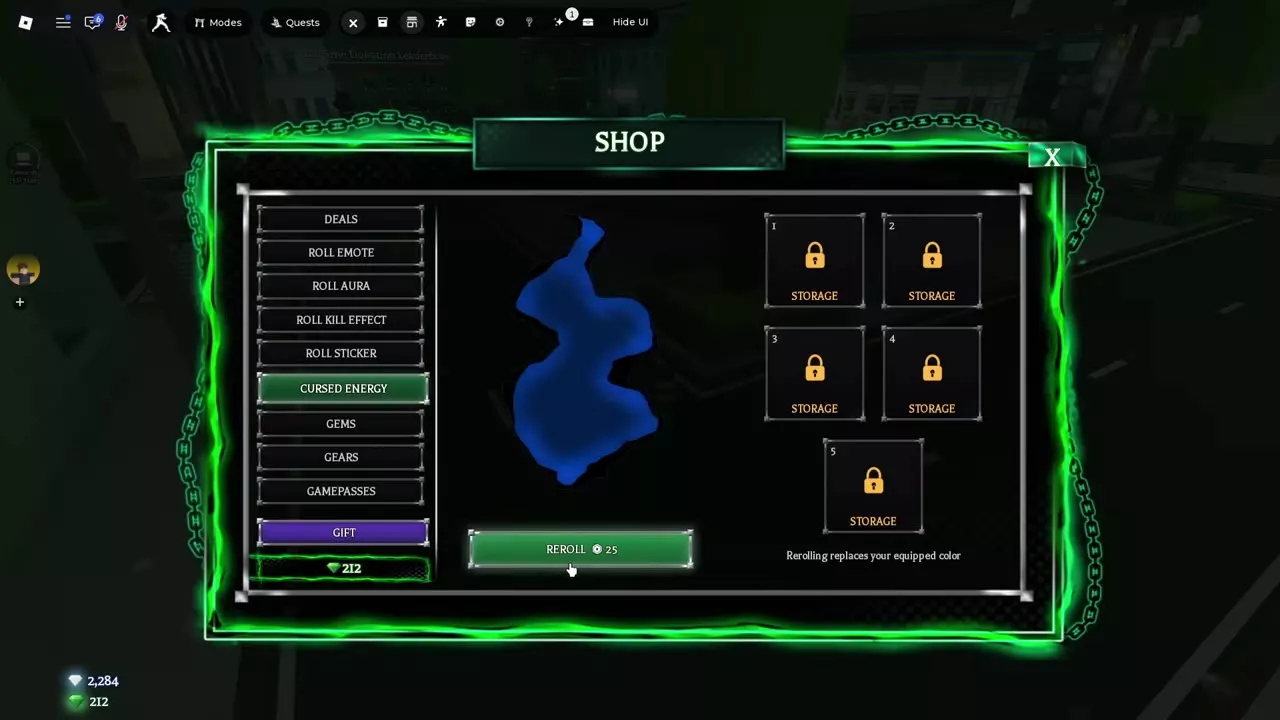
Store the Current Color Before Rerolling
- Open Shop → Cursed Energy. If you own Cursed Energy Backpack and want to keep your current rolled color, store it first.
- Choose Reroll and spend 25 Robux. The new roll replaces your equipped color.
- To return to a saved color, open Storage and swap to that color.
Default and Awakening Colors
Use Disable CE Recolor or Default CE Color in Settings to display the default Cursed Energy color. The display refreshes when you change the setting.
For a separate awakened look, own Awakening Outfit, open Settings → Premium → Awakening Outfit, and select a character and Cursed Energy color. That color applies with the outfit when you awaken. See Awakening outfit settings for the other appearance options.